
ExtraDock
Create multiple custom docks for macOS on any screen
About ExtraDock
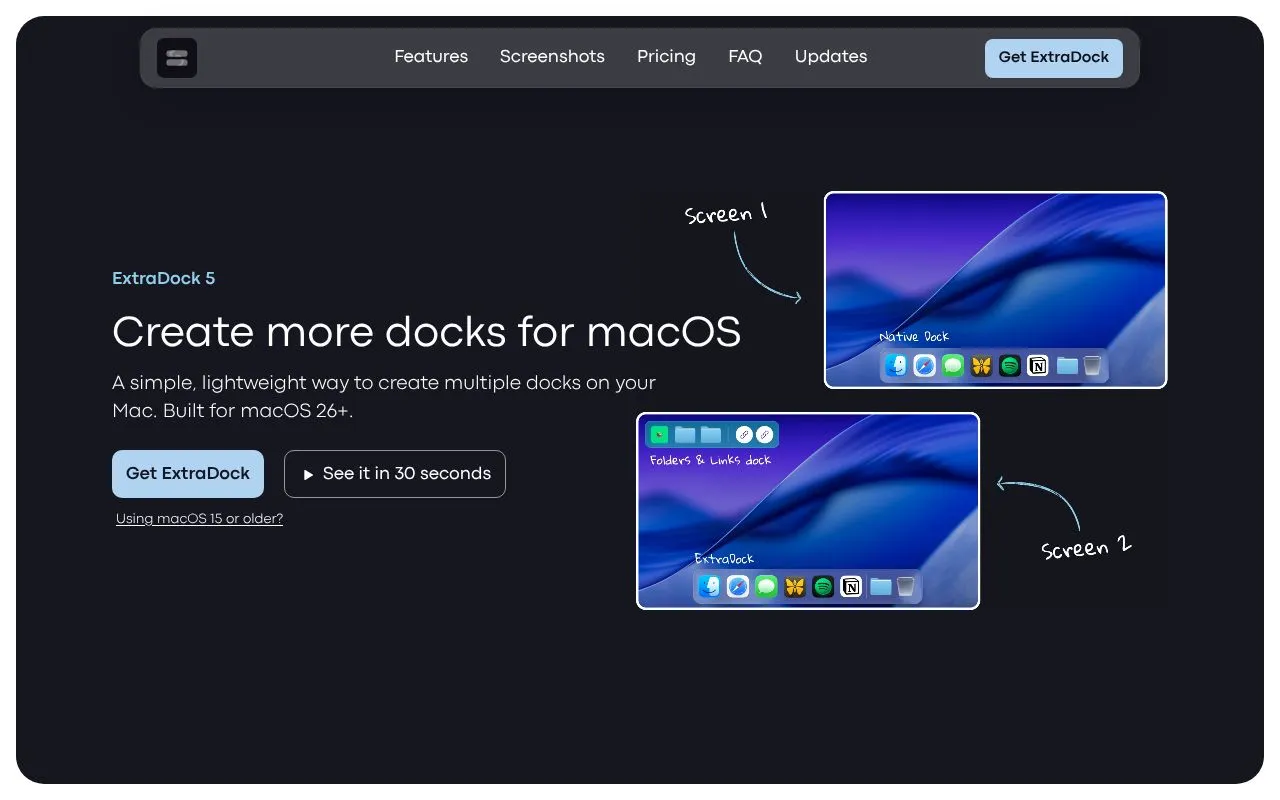
ExtraDock is a Mac app for people who want more than the single native Dock. It lets users create as many docks as they like, place them on any edge of any display, or leave them floating anywhere on the desktop. It is aimed at multi-monitor users, people who group apps into categories, and anyone who uses a small laptop to control a larger display.
Each dock is styled on its own, with color themes, solid, transparent or Liquid Glass backgrounds, adjustable icon size and spacing, and custom app icons. Behavior can also be set per dock, including auto-hide, collapsing into a single button, and hiding in fullscreen. Docks can be assigned to a specific display and return to their position when a monitor is reconnected.
Widgets extend docks beyond app shortcuts, with options such as a clock, a shelf, app folders and a Live Dock widget that mirrors the native Dock on other screens. Files can be dragged into folders or dropped onto an IDE. ExtraDock is built for macOS 26 and later, and is sold as a one-year license, lifetime license or Forever Edition.
Related tools
ExtraDock alternatives
Time Pencil
Plan your day by drawing events on an analog clock

Dayboard
A personal daily dashboard for notes, tasks and links

Bracketree
Free printable tournament brackets for 3 to 128 teams

Mom Clock
Strict alarms and app blocking to enforce focus and routines
SpinDecideWheel
Free spinning wheel of names for random picks and draws

Convertilo
Free image, PDF and text tools that run in your browser